



In today’s economy, project management and productivity are no longer reserved for large companies with massive budgets. For freelancers, consultants, small teams, and non-profit organizations, operational efficiency is key to long-term sustainability. Yet these groups often face a dilemma: use a patchwork of disconnected free tools, or pay for a software suite that only uses 20% of its capabilities. To address this exact need, Nutcache, the Quebec-based all-in-one management solution, is announcing a major new offering: a free version of its flagship application. Far from being a simple demo, Nutcache’s free plan was designed as a true growth engine for those building the projects of tomorrow. A Break from Traditional “Demo” Versions Too often, the word “free” in the world of business software comes with frustration. You often end up with trial versions limited to 14 days, or stripped-down interfaces so bare that they become unusable for real projects. Nutcache’s free plan stands out with a different philosophy. This is not a lead-in product designed to force you to pull out your credit card after a week, but a complete and sustainable work environment. Nutcache understands that for a small team or a freelancer, trust in a tool is built over time. By offering powerful features from the start, Nutcache allows users to build professional structure without financial barriers. Nutcache is free — give it a try! The Nutcache Free Plan: A Solution Built for Everyday Work One of the biggest challenges in business management is data fragmentation. You use a calendar for deadlines, a spreadsheet for expenses, a third-party app for time tracking, and another site for invoicing. This scattered approach is the number one source of errors and lost revenue. This is where Nutcache’s free plan brings tremendous value. By centralizing all essential functions within a single interface, it provides a 360-degree view of your operations. Let’s take a closer look at the pillars you can now rely on. 1. Project and Task Management Without Compromise The foundation of every success is organization. Whether you are managing a product launch, a marketing campaign, or a construction project, structure is your best ally. Nutcache offers complete flexibility: you can organize your tasks in classic lists or use the Kanban method. For a small team, this visual clarity drastically reduces status meetings and endless email chains. Everyone knows what they need to do, priorities are clear, and progress is visible in real time. 2. Built-in Time Tracking: Make Every Minute Count Time is the scarcest resource for a freelancer. Yet without a rigorous tracking tool, it is estimated that around 15 to 20% of actual work time is never billed to the client simply because it was never recorded. Nutcache’s free plan includes a professional timer. With one click, you start tracking time on a specific task. By the end of the day or month, your time entries are already prepared. This is not only useful for billing; it also helps you analyze whether you are spending too much time on low-value tasks. 3. Professional Invoicing and Estimates Brand image matters for a small business. Sending a homemade invoice in a Word document does not project the same professionalism as a structured, polished document. With this plan, you can create detailed estimates. Once an estimate is approved, it can be turned into a project, then into an invoice, in just a few clicks. This automation reduces data entry errors and speeds up your payment cycles. You can also manage your client database directly in the tool, making accounts receivable easier to track. 4. Expense Tracking: Protect Your Margins For non-profits and small businesses, every dollar matters. Small project-related expenses—travel costs, supply purchases, software subscriptions—can quickly add up and eat into your profitability if they are not tracked carefully. Nutcache allows you to link each expense to a specific project, giving you a clear view of your real costs even before your accountant gets involved. 5. Artificial Intelligence (AI) Assistance The AI built into Nutcache is first and foremost a practical everyday assistant. It helps you write faster—tasks, descriptions, notes, and content—and can also answer your questions about how the application works, right when you need help. For a freelancer or a small team, it is a real boost that saves time, helps avoid the blank-page problem, and makes it easier to get more value from Nutcache every day. Why Adopt Nutcache’s Free Plan in the Education and Non-Profit Sectors? Schools and non-profits have management needs that are just as complex as those of private businesses, but often with much more limited financial resources. For these organizations, volunteer management, grant budget tracking, and event coordination require a high level of rigor. Using this free tool allows these organizations to focus their energy where it truly matters: their social or educational mission. Instead of spending hours consolidating Excel files for a project report, coordinators can pull the data directly from Nutcache. This means greater transparency for donors and boards of directors, and valuable time saved for teams in the field. Nutcache’s Free Plan: A Foundation for Growth One of the most forward-thinking aspects of this offer is its scalability. Many free tools are dead ends: once your business grows, you have to abandon everything and move to a heavier system. With Nutcache, the path is smooth. You start with the free version to structure your first contracts. The day you hire your first employee, your client list grows, or you need more advanced automated financial reports, there is no complex migration to perform. You simply move up to the next plan. All your data, clients, and history are already there. Nutcache’s free plan is therefore a long-term investment in the stability of your digital infrastructure. Nutcache is free — give it a try! Understanding the Limits to Plan Better To provide a solution of this quality for free, some limits are necessary, but they were designed to be generous. The plan includes, among other things: 2 users Up to 10 active projects, which is enough for most freelancers managing multiple projects at once Up to 10 different clients 500 time entries 50 expenses 200 invoices and 200 estimates 25 AI credits to optimize your work 100 MB of storage for your important documents
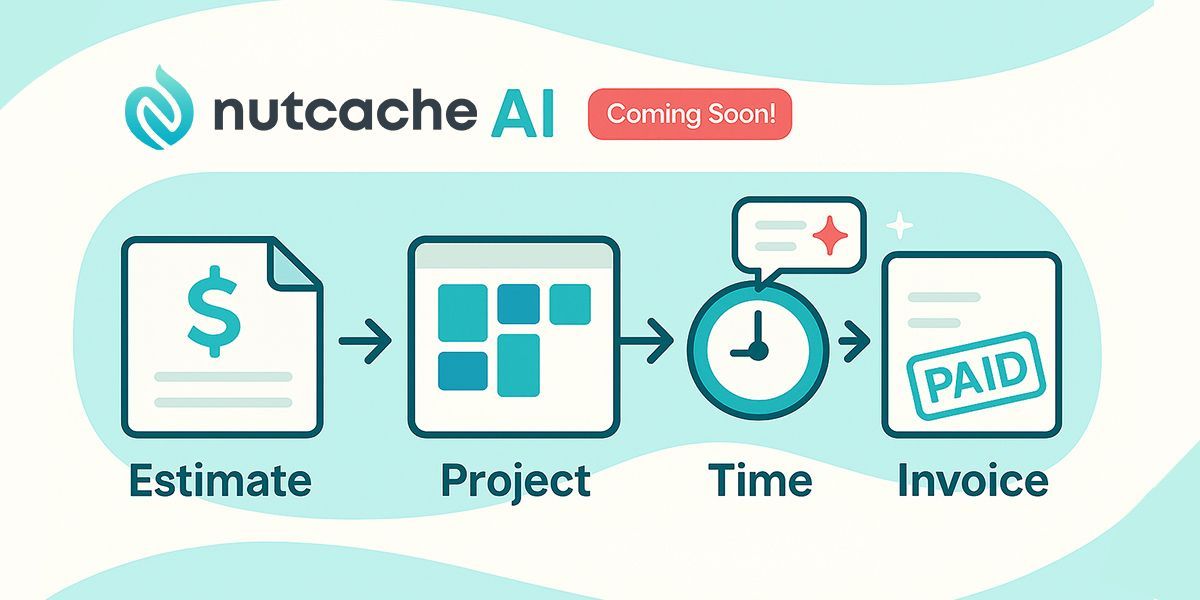
Let’s be honest: a lot of business software has taken a strange turn. You sign up. You explore the app. You start to see how it could really help your team…and that’s when the trial ends and the paywall drops. With Nutcache, we wanted to do things differently. From the beginning, our goal has been simple: help you follow a project from the very first estimate to the final invoice, with time, expenses and budgets under control. And we know a large part of our user base—freelancers, small studios, micro-teams—doesn’t always have the volume or the budget for a heavy monthly subscription. That’s why we will soon be introducing the new Nutcache Free plan . And it’s also why we’re investing in AI capabilities with a very practical purpose: removing friction, not adding noise. Nutcache Free plan: a real free plan for real work Nutcache Free will not be a disguised demo or a 14-day countdown. It will be a permanent free plan , designed for: Freelancers and consultants Two-person or very small teams Small businesses that want proper project and billing management without a long list of tools and subscriptions With the Free plan, you will be able to: Follow your projects from estimate to invoice in a single app Log your time entries to see where your effort really goes Track project expenses so you don’t forget to bill them Create and send estimates and invoices to your clients Keep a focused list of clients and projects that’s enough for a small operation In other words, if you’re working solo or in a small team, you will run your day-to-day client work on Nutcache Free, without a credit card and without commitment. And when your business grows to a point where the Free plan will no longer enough, you can move to a paid plan and keep everything: your projects, time entries, expenses, clients, invoices—the whole history. Who is the Nutcache Free plan really for? Let’s be transparent: if you have a large team, dozens of active projects and a constant stream of time entries every month, the Free plan won’t be enough for you. That’s expected. But it will be exactly right if: You’re a solo consultant or freelancer with a handful of active clients You’re a small shop (two or three people) and still invoicing with Word/Excel You’re launching a new service or side business and want to keep fixed costs low while you test the market You tried Nutcache in the past and liked the “estimate → project → time → invoice” flow, but weren’t ready for a subscription at that time For these use cases, Nutcache Free will not be a toy. It will be a usable, reliable workspace with limits designed for small structures rather than for trial-only usage.

Project management for A/E firms is evolving rapidly as technology, client expectations, and regulations reshape how projects are delivered. Modern project management practices are now central to navigating this environment, providing tools that streamline collaboration, safeguard sensitive data, and optimize productivity. This article explores the latest trends in project management for A/E firms, with a focus on artificial intelligence (AI), security and compliance, and human-centric leadership. By understanding these shifts, firms can position themselves to thrive in an increasingly competitive market. The rise of AI in project management for A/E Firms Artificial intelligence is no longer futuristic—it is a practical tool already influencing how project management is carried out. According to the Project Management Institute (PMI) , AI is set to impact nearly 80% of project management tasks over the next decade. For architecture and engineering firms, AI is especially relevant in areas such as: Task Automation : Automating repetitive tasks like scheduling, reporting, or data entry frees up time for architects and engineers to focus on higher-value creative and technical work. Predictive Insights : AI can analyze historical project data to anticipate risks, delays, or budget overruns, allowing managers to take proactive measures. Natural Language Processing : Chatbots and virtual assistants powered by AI help teams find project details quickly, answer common questions, or even draft progress updates. Example: A mid-size architecture firm might use AI-driven analytics to predict which phases of a hospital design project are most likely to experience bottlenecks. By anticipating issues early, the firm can allocate resources efficiently and avoid costly delays. Security and compliance in project management for A/E Firms A/E firms handle sensitive data daily—building plans, financial information, and client communications. With increasing cyber threats and stricter privacy regulations, A/E firms must prioritize security. According to a PwC 2024 Global Digital Trust Insights report , cybersecurity remains one of the top three concerns for professional services firms worldwide. Emerging best practices include: Multi-factor Authentication (MFA) : Ensures only authorized users access project data. Data Encryption : Protects information both at rest and in transit. Regional Data Hosting : More firms are demanding data centers within their own country to comply with local laws, like GDPR in Europe or Quebec’s Law 25 in Canada. These measures not only protect clients but also build trust. A client who knows their architectural blueprints are secure is more likely to continue working with the same firm. Human-centric leadership in project management While technology is transforming project management, human leadership remains at the heart of success. Harvard Business Review highlights that organizations balancing digital transformation with people-centered leadership achieve stronger long-term outcomes. For A/E firms, this means focusing on: Transparent Communication : Leaders must foster open dialogue, ensuring all stakeholders understand project goals, risks, and progress. Work-Life Balance : Workload tracking can help identify when employees are overloaded, preventing burnout. Collaborative Culture : Digital systems are most effective when paired with a culture that values collaboration across disciplines. For example, a structural engineering team might use digital collaboration platforms to share updates in real-time, but the success of the approach depends on managers encouraging a culture of transparency and trust.

At Starbucks, ordering a drink is about much more than the beverage itself it’s about the experience. Customers are drawn to the atmosphere and leave impressed by a work culture that feels both distinctive and enjoyable. Of course, a company of Starbucks’ stature didn’t reach this level of prestige by accident. Over the years, it has implemented a range of practices designed to elevate both customer satisfaction and employee excellence.

Project‑management software now saves the average employee ≈ 498 hours a year—more than twelve 40‑hour work‑weeks, according to multiple 2024–25 studies . Firms that use a dedicated PM platform are also 66 % more likely to stay on budget than those that rely on spreadsheets and email alone. Below are the top 10 project management software solutions for architects in 2025. We evaluated each product on architecture‑specific features, ease of use, integrations and verified customer feedback. Nutcache leads the field, but every solution has clear strengths (and limits) so you can choose what fits your practice best. Quick‑view comparison